 TrainNotes
Muscle training frequency
How often was each muscle trained, rather than how many sets did it receive?
What it shows
Each row is a muscle or group. Coloured timeline cells indicate training days in a time bucket. The right-hand Days or Avg/w column describes frequency; Sets/w or kg/w describes average workload per week.
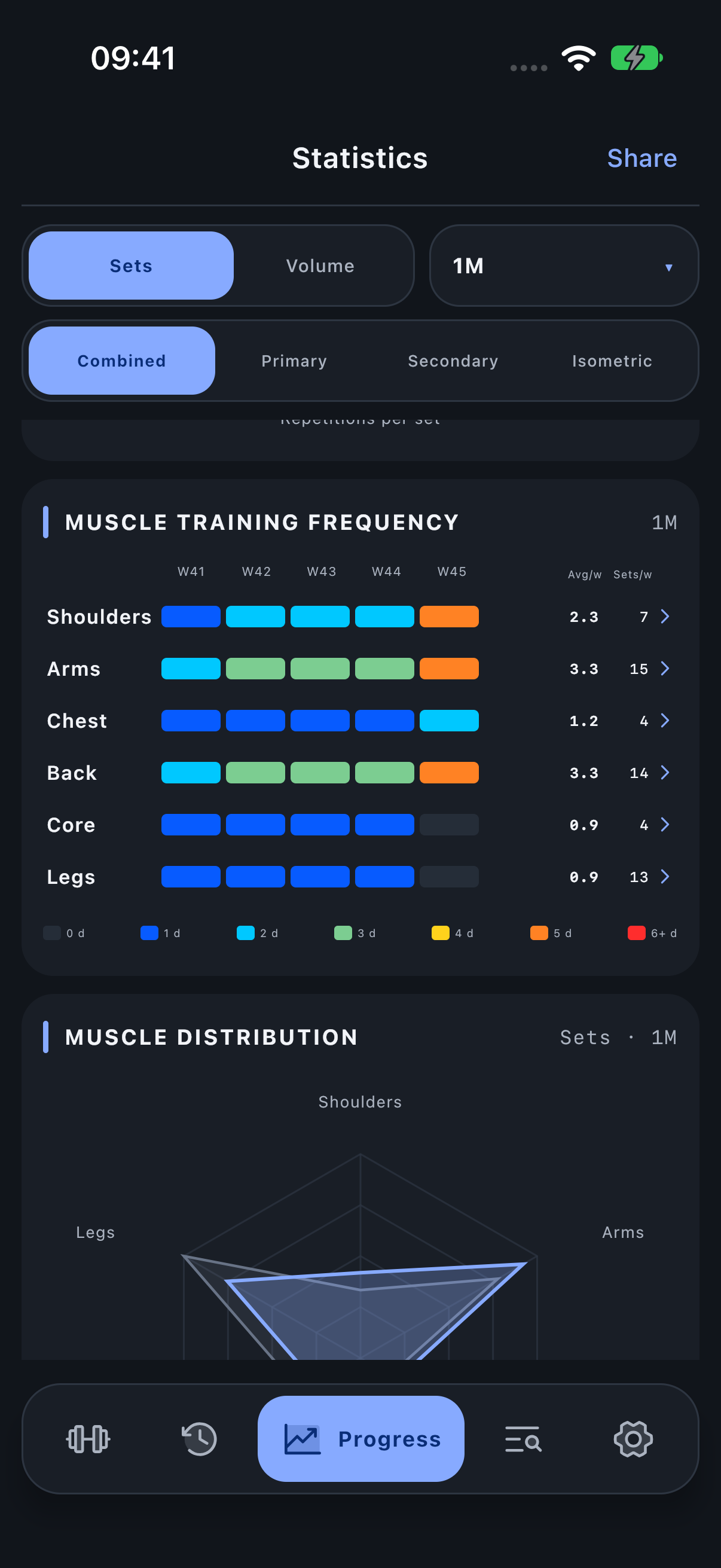
How to read it
Use the colour legend: a cell marked as three days means activity on three distinct dates, not three sets. Scroll the timeline horizontally when older buckets are outside the visible area. Tap a row to inspect its muscle scope.
Six sets for Chest on Monday count as one training day. Three on Monday and three on Thursday count as two. Both total six sets, but the frequency is different. With a 28-day history and eight qualifying dates, the average is two days per week.
Period, units and filters
The period controls the timeline. In short periods the frequency column is Days; longer periods use average training days per week. Avg/w = qualifying training dates × 7 ÷ counted days. Counted days is the shorter of the selected window and the available history from the oldest finished session through today; All uses the full available history. Use the actual number of counted days; do not round up to whole weeks. The role filter selects which involvement qualifies. Combined counts a calendar day once even if several roles or sets involved the muscle.
Investigate the result
Use Muscle sets for absolute contribution and the anatomical map to locate the involved regions.
Open Progress → Statistics and scroll to the named module.