 TrainNotes
Record a drop-set sequence
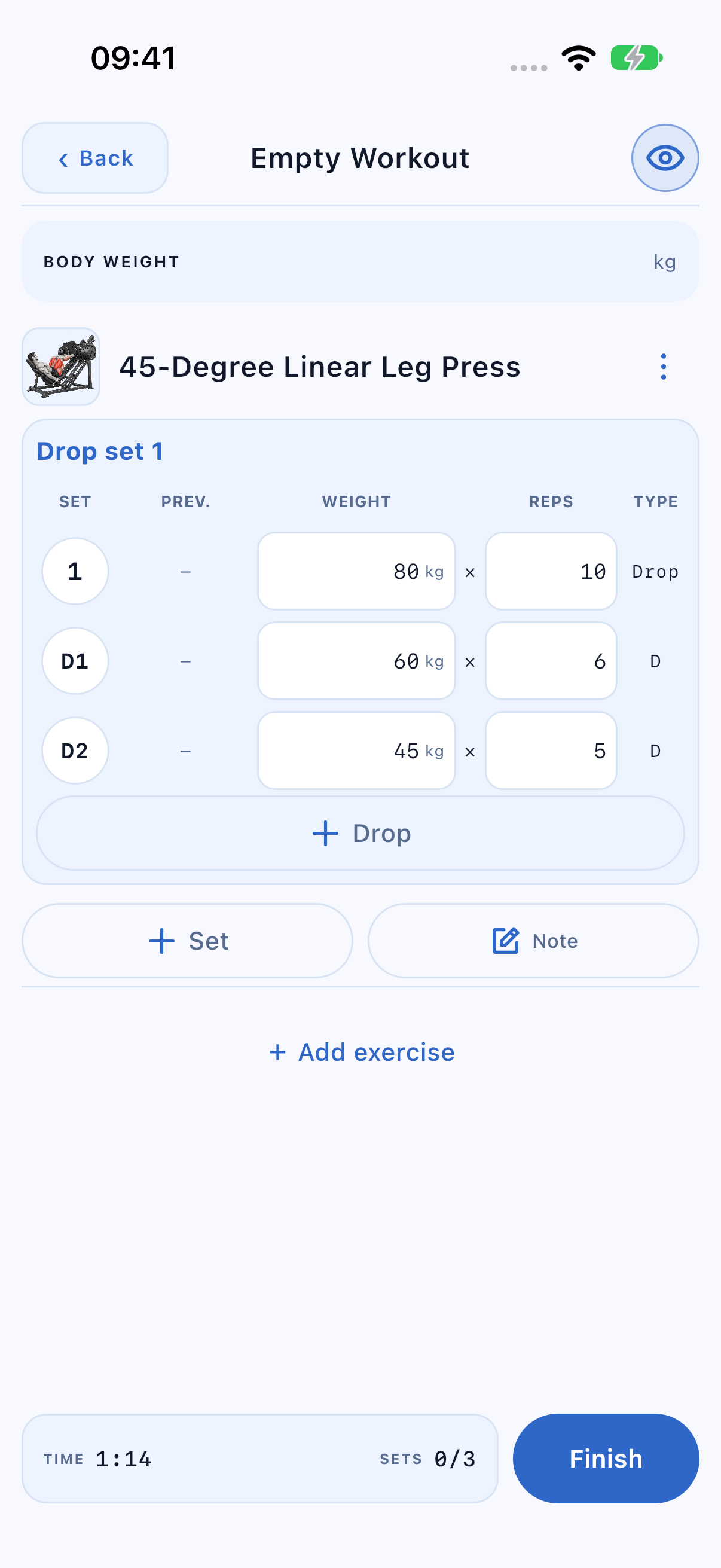
A drop set contains a main stage followed by lower-load stages performed without rest between them. TrainNotes preserves each stage’s values while keeping them visually grouped.
Create the stages
- Enter the main set’s weight and reps.
- Open its Type and select Drop set. A first stage D1 appears under the main row.
- Enter D1’s lower load and reps.
- Use + Drop inside the set to add another stage, such as D2. It extends that set rather than adding a normal set.
Read the set as a sequence
80 × 10 → 60 × 6 → 45 × 5 means ten reps at 80, then six at 60, then five at 45. It is not one averaged 61.7 kg set. Each completed stage remains a separate historical result for volume and PR checks. Here the three completed stages contribute three working rows and 80 × 10 + 60 × 6 + 45 × 5 = 1,385 kg of actual volume. The visual grouping does not average or collapse their results; Statistics can then apply its involvement-role weights.
Complete the stages and rest
Tap each stage’s completion badge after that work is done. No ordinary rest starts after the main stage while unfinished drops remain. Rest starts after the final stage. If you extend an already completed set with another Drop, finish that stage before its rest boundary.
Adding the next normal set uses the set’s starting load rather than promoting the last reduced load into an ordinary-set target.
Return to an ordinary set
- Open Type on the main row.
- Choose Working set or Remove Drop set.
- Confirm if a drop stage being removed already contains completed work.
- Check the main row: its values and completion remain, while the added drop stages are removed.
A compact red × can remove an individual added stage where offered. Removal of recorded work is different from marking a badge incomplete.
Keep drops inside a group round
Within a superset or circuit, the main and drop stages stay inside that member’s slot. Completing D1 does not add a new round. The configured transition or round rest follows the final stage of that member, not the first weight reduction.